Project
portfolio
>
over-mij.md
over-mij.md
Hallo, ik ben Bryan Piek.
Een softwareontwikkelaar met een pragmatische aanpak en een sterke focus op C# en JavaScript. Ik ben gedreven door het bouwen van functionele en goed gestructureerde applicaties. Het analyseren van een complex probleem en dit vertalen naar een solide, technische oplossing is waar mijn kracht ligt.
Buiten het toetsenbord om ben ik een fanatiek gamer en volg ik de nieuwste anime. Deze werelden bieden niet alleen ontspanning, maar ook een constante bron van inspiratie voor creatieve oplossingen.
Dit portfolio dient als een showcase van mijn werk.
# Mijn technische vaardigheden en favoriete tools

languages:
  - C#
  - JavaScript
  - Java
  - PHP
  - SQL

frameworks_libraries:
  - .NET Core & ASP.NET
  - Node.js & Express
  - Entity Framework

databases:
  - MySQL
  - MongoDB

tools_platforms:
  - Git & GitHub
  - Docker
  - JetBrains Rider
  - JetBrains PHPStorm
  - Visual Studio Code
[Heden] [INFO] Actief in opleiding Software Developer bij ROC van Twente, Almelo.
[2024-02-01] [INFO] Start stage en bijbaan als Web Developer bij Boekwinkeltjes.nl, Nijverdal.
[2022-09-01] [INFO] Start opleiding Software Developer (MBO 4) bij ROC van Twente, Almelo.
[2022-07-01] [SUCCESS] Diploma Verspaner behaald bij ROC van Twente, Hengelo.
[2020-08-01] [INFO] Start BBL opleiding Verspaner bij Metal Machinebouwers, Nijverdal.
[2020-08-01] [SUCCESS] Diploma middelbare school (PI) behaald bij CSG Reggesteyn, Rijssen.
[2020-02-01] [INFO] Start eindstage middelbare school bij Metal Machinebouwers, Nijverdal.
[2018-05-01] [INFO] Start stage en bijbaan als Metaalbewerker bij Broeze, Nijverdal.
[2015-08-01] [INFO] Start middelbare school bij CSG Reggesteyn, Rijssen.
a8fbc12 (HEAD -> main) Bryan Piek - 2 dagen geleden
  feat: Git history log toegevoegd

3c4d5e6  Bryan Piek - 3 dagen geleden
  feat: Thema-wisselaar (licht/donker) geïmplementeerd

9f1a2b3  Bryan Piek - 4 dagen geleden
  feat: Carrière tijdlijn toegevoegd als 'carriere.log'

b4c5d6e  Bryan Piek - 5 dagen geleden
  fix: Responsiviteit en mobiele weergave verbeterd

1e2f3g4  Bryan Piek - 1 week geleden
  refactor: Layout omgezet naar PHPStorm stijl

7h8i9j0  Bryan Piek - 1 week geleden
  feat: Projecten worden dynamisch geladen via GitHub API

k1l2m3n  Bryan Piek - 2 weken geleden
  initial commit
function getGamingLibrary() {
  return {
    currently_playing: "Modded Minecraft: ATM 10 To The Skies",
    platforms: [
      "PC",
      "Nintendo Switch"
    ],
    top_5_all_time: [
      "Minecraft",
      "Assassin's Creed IV: Black Flag",
      "Call of Duty (Series)",
      "Satisfactory",
      "Dying Light"
    ]
  };
}
Anime Watchlist
Een overzicht van series die ik heb gezien
Gezien & Favorieten
- [x] Solo Leveling
- [x] Jujutsu Kaisen
- [x] Death Note
- [x] Spy x Family
- [x] That Time I Got Reincarnated As A Slime
- [x] Given
- [x] Sasaki and Miyano
- [x]Campfire Cooking in Another World with My Absurd Skill
En een bult meer. :)
// Een overzicht van mijn muzieksmaak
const myMusic = {
  favorite_genres: [
    "K-pop",
    "90s Classics",
    "2010-2016 Hits",
    "Rock",
    "Rap"
  ],
  top_artists: [
    "BLACKPINK",
    "Stray Kids",
    "Linkin Park",
    "Evanescence",
    "Lady Gaga",
    "Ariana Grande",
    "Vana",
    "Spiritbox",
    "Rihanna",
    "Rammstein",
  ],
  currently_listening: "Een mix van K-pop, rock en classics."
};
BlockyTK
A graphical user interface overlay for Minescript using CustomTkinter
BlockyTK
BlockyTK is a graphical user interface (GUI) overlay for Minescript, allowing you to manage, configure, and run your Python automation scripts directly from within Minecraft.
Features
- In-Game GUI: A modern, dark-themed overlay (built with
customtkinter) that sits on top of your Minecraft window. - Script Manager: Browse automatically categorized scripts found in your
minescript/scripts/folder. - One-Click Execution: Start and stop scripts with a "Run/Stop" button.
- Visual Configuration: Configure script parameters (numbers, booleans, dropdowns) using sliders and switches—no code editing required.
- Hotkeys: Bind scripts to keyboard shortcuts for instant activation.
- Portable: Uses a local
lib/folder for dependencies, keeping your installation clean and self-contained.
Installation
Prerequisites
- Minecraft with the Minescript mod installed.
- Python 3.x installed and configured in Minescript's
config.txt.
Setup
Download: Download this repository and place the contents into your Minescript folder.
- Path:
%appdata%\.minecraft\minescript\(or your specific profile'sminescriptfolder).
- Path:
Install Dependencies: BlockyTK relies on
customtkinter, which is not included by default. To make installation easy and portable, we've provided a helper script.Open a terminal in your
minescriptfolder and run:python install_dependencies.pyThis will install the required libraries into a local
lib/folder, ensuring the Hub works immediately without needing to modify your global Python environment or Minescript'sPYTHONPATH.
Usage
Start the Hub: In Minecraft, open the chat and type:
\gui_launcherNote: The first time you run this, it might take a moment to initialize.
Toggle the Menu: Once loaded, you will see a message: "BlockyTK loaded. Press R-Shift to toggle." Press Right Shift to open/close the menu.
Running Scripts:
- Browse: Use the sidebar to find scripts by category.
- Configure: Click "Configure" to change settings (e.g., bridge material, build delay).
- Run: Click the "Run" button to start the script. The button will change to "Stop" while it is running.
Shortcuts:
- Go to a script's "Configure" page.
- Click the Shortcut button.
- Press any key to bind that script to the key.
- You can now trigger that script anytime by pressing that key (even when the menu is closed).
Writing Scripts for the Hub
To make your own scripts appear in the Hub, they must export a UI_CONFIG using the ScriptUI helper.
Here is an example using bridge.py (found in scripts/bridge.py):
- Create a new
.pyfile inminescript/scripts/. - Import
minescriptandminescript_ui. - Define your UI and
runfunction:
import minescript
import time
import math
from minescript_ui import ScriptUI

# 1. Define UI
ui = ScriptUI("Auto Bridge", category="Travel", description="Automatically places blocks under your feet if there is air.")
ui.dropdown("material", "Material", ["stone", "cobblestone", "dirt", "oak_planks", "glass"], default="cobblestone")
ui.float("delay", "Check Delay", default=0.05, min=0.01, max=0.5)

# 2. Export Config
UI_CONFIG = ui.export()

# 3. Main Logic
def run(params, stop_event):
    mat = params['material']
    delay = params['delay']
    minescript.echo(f"🌉 Bridge Builder Active ({mat}). Walk carefully!")

    while not stop_event.is_set():
        px, py, pz = minescript.player_position()

        # Block immediately below feet
        # Use math.floor(py) - 1 for block under feet
        bx, by, bz = round(px), math.floor(py) - 1, round(pz)

        # "setblock x y z block keep" only places if air.
        minescript.execute(f"setblock {bx} {by} {bz} {mat} keep")

        if stop_event.wait(delay): break

    minescript.echo("🛑 Bridge Builder Stopped.")
Configuration
config.txt: Standard Minescript configuration.gui_config.py: Generated file storing your shortcuts and Hub preferences. Do not edit manually unless necessary.
Troubleshooting
- "Module not found": Run
python install_dependencies.pyagain to ensurelib/is populated. - Menu not showing: Check the chat for errors. Ensure you are running
\gui_launcher, not\gui_launcher.py.
minescript-c2
A web ui module for the Minecraft mod Minescript
🎮 Minescript C2 (Command & Control)
Minescript C2 is a powerful, web-based dashboard for Minescript that allows you to control your Minecraft automation scripts remotely.
It features a modern "Command and Control" interface with live chat, real-time inventory monitoring, and one-click script execution—all from your browser.
✨ Features
- Two Operating Modes:
- 🏠 Internal Mode: Hosts the dashboard directly from your Minecraft client (localhost).
- ☁️ External Mode: Connects to a remote relay server, allowing you to control your player from anywhere (e.g., via ngrok or a VPS).
- 📂 Script Manager: Automatically detects and loads Python scripts from your
scripts/folder. - 💬 Live Communication: View and send chat messages from the web interface.
- 🎒 Real-time Inventory: Monitor your player's inventory updates live.
- 🛑 Emergency Stop: Kill all running automation jobs instantly.
- 📦 Auto-Dependency Management: Self-contained
lib/folder installation.
📦 Installation
Download the Code: Clone this repository or download the source code.
Install Dependencies: Run the setup script once to install necessary libraries (
websocket-serverandwebsocket-client) into the locallib/folder.# In your Minescript console \setupNote: The dashboard is self-contained. It installs dependencies locally so you don't need to mess with your global Python environment.
🚀 Usage
Option 1: Internal Mode (Localhost)
Best for single-player or local testing. The dashboard runs on your PC.
- Create a
start.pyfile:from dashboard import Dashboard # Starts Web Server on port 8000 and WebSocket on 8999 dash = Dashboard( external=False, script_folder="./scripts", auto_open=True # Automatically opens your browser ) dash.start() - Run
\startin Minecraft. - Your browser will open to
http://localhost:8000.
Option 2: External Mode (Remote Control)
Best for controlling your account remotely or sharing access.
- Start the Relay Server on your PC or VPS (standard Python, not inside Minecraft):
python relay_server.py - Start the Minecraft Client:
from dashboard import Dashboard dash = Dashboard( external=True, host="localhost", # Or your VPS IP / ngrok URL port=9000, # Relay WebSocket port script_folder="./scripts" ) dash.start() - Open
http://localhost:3000(or your relay URL) to control your Minecraft client.
📂 Project Structure
minescript-c2/
├── dashboard.py       # Core library (Web & WebSocket servers)
├── job_manager.py     # Handles loading and running background jobs
├── setup.py           # Dependency installer
├── relay_server.py    # (Optional) Standalone server for External Mode
├── ui/                # (Generated) Web frontend files
├── lib/               # (Generated) Local Python dependencies
└── scripts/           # PUT YOUR SCRIPTS HERE
    ├── mining.py
    ├── fishing.py
    └── ...
🛠️ Creating Custom Scripts
Add any .py file to the scripts/ folder. It must have a run(stop_event) function.
Example: scripts/hello.py
import minescript
import time

def run(stop_event):
    minescript.echo("Job started!")

    while not stop_event.is_set():
        # Do work here
        minescript.echo("Working...")

        # Use wait() on the event instead of time.sleep() for responsive stopping
        if stop_event.wait(5):
            break

    minescript.echo("Job stopped.")
🤝 Contributing
Feel free to submit issues or pull requests.
AShortPath
AShortPath
A lightweight path-finding Minecraft bot for the Minescript modloader. AShortPath uses the Theta* algorithm to produce smooth, short routes in voxel worlds—often shorter than classic A* paths thanks to line-of-sight shortcuts.
Credit & inspiration: hyshenn/thetaSTAR
Features
- 🚀 Fast, greedy-any-angle routing with Theta*
- 🧭 Simple, minimal API (
path_find,path_walk_to) - 🧱 Works directly with Minecraft
(x, y, z)block coordinates - 🧠 Automatically handles “no path” cases
Quick Start
Create a small Minescript script and run it in your world:
from AShortPath.thetastar import path_walk_to, path_find
import minescript

# Start at player position; set your target coordinates here:
start = minescript.player_position()
goal = (600, 72, 1200)

path = path_find(start, goal)

if not path:
    minescript.echo("No path found.")
else:
    minescript.echo(f"Path length: {len(path)}")
    # Walk the computed path.
    path_walk_to(path=path, distance=1)
What you’ll see
- If a path exists, the bot walks it and prints the path length in chat.
- If no path exists (e.g., blocked or unreachable), you get a clear message instead.
Installation
AShortPath is a pure-script drop-in.
Copy the
AShortPath/folder into your Minescript scripts directory (or any location that is on your Minescript/Python path).Import it from your script:
from AShortPath.thetastar import path_find, path_walk_to
If your environment uses a custom loader, make sure
AShortPathis importable (e.g., added toPYTHONPATHor your Minescript modules directory).
API
path_find(start, goal) -> list[tuple[int, int, int]] | None
Compute a path between two block coordinates.
- start:
(x, y, z)– typicallyminescript.player_position() - goal:
(x, y, z)– your destination - returns: A list of
(x, y, z)waypoints, including start/goal, orNoneif unreachable.
path_walk_to(path, distance: int = 1) -> None
Walk an existing path.
- path: The list returned by
path_find - distance: Stop when within this many blocks of the goal (default
1)
Separation of concerns: compute once with
path_find, then hand the path topath_walk_to. This lets you inspect/modify the path before moving (e.g., visualize or trim it).
How It Works (In Short)
AShortPath uses Theta, an any-angle variant of A:
- It performs line-of-sight checks between a node and its parent, letting it “cut corners” across free space.
- The result is typically shorter and smoother than grid-constrained A* paths.
- The world is treated as a voxel grid using collision checks to avoid solid blocks.
Tips & Gotchas
- Coordinate system: Use integer
(x, y, z)block positions. - Performance: Planning cost grows with search radius and obstacle density. Prefer realistic goals over extreme distances when possible.
Contributing
Bug reports and improvements are welcome! Please keep contributions focused and well-scoped (small PRs are easier to review and test).
Credits
- Algorithm: Theta*
- Inspiration & basis: hyshenn/thetaSTAR
Litematica-Excel
Change the LiteMatica material list.txt to an excel variant.
Litematica Excel
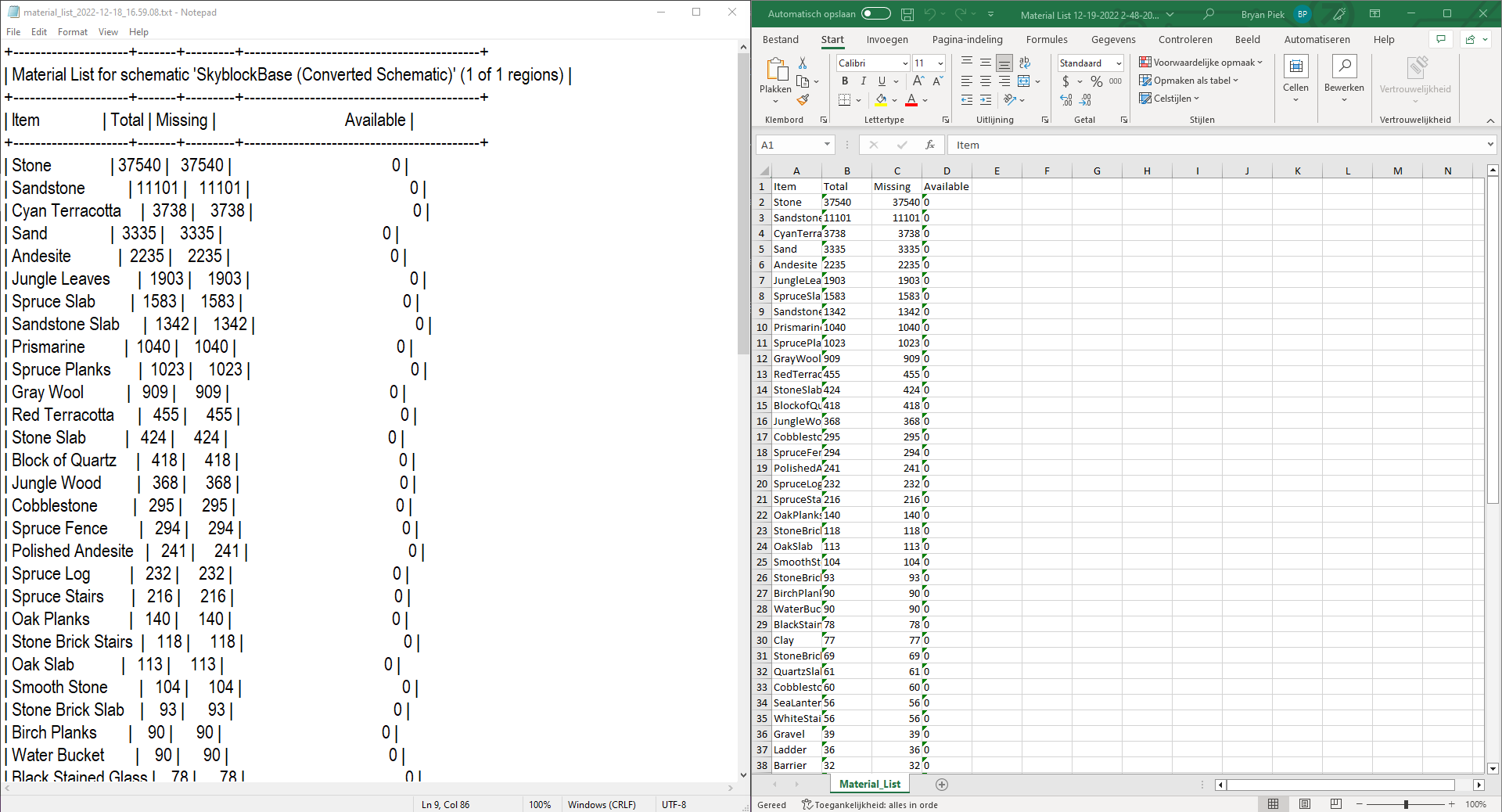
TXT to Excel parser for Litematica's material list.


Download
Features
- Automatically create an Excel file from your material list.
- Use a formula so the Missing gets lower the more of the materials you have available.
- Remove excessive data in txt file.
How it works
- Compile or download this project (Download can be found on the release page).
- Open the program.
- Press enter and select the material files.
- Wait while the program finishes converting.
- Close the program and enjoy the excel file which can be found in the programs folder.
Example


Contributor
Thanks to this amazing contributor:
 |
|---|
| @tlorius |
| 🛠️ |
FileSafe
Protect and secure your files effortlessly





FileSafe
FileSafe is a versatile program designed to protect and secure your files effortlessly. Below, you'll find an overview of its powerful features and capabilities.
Explore the docs »
View Demo
·
Report Bug
·
Request Feature
Table of Contents
About The Project

The FileSafe project is a robust file protection application designed to safeguard your important files. It offers a range of powerful features to ensure your data's privacy and security. Whether you want to simply hide files, encrypt them, or even secure the binary files, FileSafe has you covered.
Features
Hide Files: FileSafe can make all files within its directory invisible and inaccessible through regular file explorers.
EncryptBinFile: This feature encrypts the entire binary file containing the file binaries, ensuring that even if someone tries to access the binary file directly, the contents remain secure and unreadable without the correct password.
Change Password: Easily modify the password used to lock and unlock the hidden files for enhanced security.
Getting Started
If you want to experience the security and convenience of FileSafe, follow these simple steps to get started:
Installation
Download:
- Download the latest release of FileSafe from the official GitHub repository.
Run the Executable:
- Locate the FileSafe executable file.
- Run the executable to launch FileSafe on your system.
Password Setup:
- During the initial setup, you'll be prompted to set a password for locking and unlocking your hidden files. Ensure you choose a strong and memorable password for maximum security.
How to Use
FileSafe provides a straightforward user interface with the following key features:
Lock: This feature hides all files within the directory where the FileSafe executable is placed. It makes them invisible and inaccessible through regular file explorers.
Unlock: Use this feature to access your hidden files. You'll be prompted to enter the correct password set during the initial setup. Once the correct password is provided, all hidden files become visible and accessible again.
Change Password: Easily modify your password by accessing the "Change Password" option within FileSafe.
Settings
FileSafe offers three settings to customize your file protection preferences:
Strictly Hide Files: Select this option to only hide the files within the directory without encrypting them. The files remain in their original state.
Hide and Encrypt Files: This option not only hides the selected files but also encrypts them using a secure encryption algorithm, providing a higher level of security for your sensitive data.
EncryptBinFile: By choosing this option, FileSafe encrypts the entire binary file containing the file binaries, ensuring the contents remain secure and unreadable without the correct password.
Security Reminder
Remember to keep your password secure and avoid sharing it with unauthorized individuals. If you forget your password, it might be impossible to recover the hidden files, especially if they are encrypted. So, always keep a backup of important files outside of FileSafe if needed.
Enjoy using FileSafe to protect your valuable files and maintain your privacy!
Sudoku-Solver
A sudoku solver made in C#





Sudoku Solver
A working sudoku solver where you can also ask for random sudoku's to play
Explore the docs »
View Demo
·
Report Bug
·
Request Feature
Table of Contents
About The Project
[ ]
]
The Sudoku Solver is a software application that solves Sudoku puzzles using a backtracking algorithm. It provides a graphical user interface (GUI) for users to interact with and solve Sudoku puzzles.
This Sudoku Solver project provides an interactive and efficient way to solve Sudoku puzzles using a desktop application. It is designed to enhance the puzzle-solving experience by automating the solution process and offering a user-friendly interface.
Built With
This section should list any major frameworks/libraries used to bootstrap your project. Leave any add-ons/plugins for the acknowledgements section. Here are a few examples.
- Programming Language: C#
- Framework: .NET Framework
- GUI Development: Windows Forms
- JSON Parsing: Newtonsoft.Json
Getting Started
This is an example of how you may give instructions on setting up your project locally. To get a local copy up and running follow these simple example steps.
Installation
To install and run the Sudoku Solver application on your machine, follow these steps:
Prerequisites:
- Make sure you have the .NET Framework installed. You can download it from the official Microsoft website.
- Ensure you have a compatible operating system (e.g., Windows 11, Windows 10, Windows 8.1, Windows 7).
Download:
- Download the latest release of the Sudoku Solver application from the project's GitHub repository.
Extract the Files:
- Extract the downloaded ZIP file to a directory of your choice.
Run the Application:
- Navigate to the extracted directory and locate the executable file (e.g., Sudoku_Solver.exe).
- Double-click on the executable file to run the application.
User Interface:
- The Sudoku Solver application will open with the main GUI, displaying the Sudoku grid.
Usage
- Load a Sudoku puzzle by clicking on the "Load Random" button to fetch a random puzzle or use the "Clear" button to start with an empty grid.
- Fill in the empty cells with numbers from 1 to 9.
- Click the "Solve" button to solve the puzzle. If a solution is found, the solved puzzle will be displayed in the grid.
Enjoy solving Sudoku puzzles with the Sudoku Solver application!
Roadmap
- Graphical User Interface (GUI): The program has a user- [x]friendly interface built using Windows Forms in C#. It allows users to interact with the Sudoku grid visually.
- Puzzle Generation: The program can generate Sudoku puzzles by fetching data from an API or using a predefined template. Users have the option to load a random puzzle or start with an empty grid.
- Puzzle Solving: The application uses a backtracking algorithm to solve the Sudoku puzzle. It provides a Solve button that attempts to find a solution for the given puzzle.
- Input Validation: The program validates user input to ensure that only valid numbers from 1 to 9 are entered in the Sudoku grid. It displays error messages for invalid input.
- Visual Representation: The Sudoku grid is displayed using a table- [x]like structure with text boxes for each cell. Filled cells are shown with a dark gray background, while empty cells are displayed with a white background.
- Solution Display: Once the puzzle is solved, the program displays the solved puzzle in the Sudoku grid, highlighting the solution cells.
See the open issues for a full list of proposed features (and known issues).
License
Distributed under the MIT License. See LICENSE.txt for more information.
VOCzel-v1
Easy and Customizable voice assistant
Voczel v1
Easy and Customizable voice assistant.

Download
Features
- Has prebuild commands.
- Uses custom commands which can be programmed in C#.
- Custom commands get imported directly.
Prebuild Commands
- Voczel (Starts the Listener and waits for its command)
- Stop Listening (Stop the listener)
- Shutdown (Shuts down Voczel)
- Mute (Mutes Voczel)
- Unmute (Unmutes Voczel)
- Reload Commands (Reloads all custom commands)
- Hide (Hides Voczel into your system tray)
- Unhide shows Voczel on your screen)
Custom Commands
How it works
Make a .cs file in the Commands directory.
After making that, Restart Voczel or ask Voczel to "Reload Commands"
Example
Close all Chrome processes:
using System;
using System.Diagnostics;
using System.Speech.Synthesis;
class MyScript
{

    static SpeechSynthesizer speech = new SpeechSynthesizer();

    public void ExecuteAFunction()
    {

        Process[] chromeInstances = Process.GetProcessesByName("chrome");

        foreach (Process p in chromeInstances) {
            p.Kill();
        }
        speech.SpeakAsync("Closed all chrome windows for you.");
    }
}
{
  "naam": "Bryan Piek",
  "beroep": "Software Ontwikkelaar",
  "contact": {
    "email": "[email protected]",
    "github": "github.com/BitMap7487"
  },
  "beschikbaar_voor_werk": false,
  "locatie": "Nijverdal, Nederland"
}
TERMINAL
DEBUG
PROBLEMEN
> Welkom op mijn portfolio.
_